
WizWiki: Tutorials / Hacks / Tips!
- WizKhalifaX_

- May 28, 2022
- 2 min read
Main Titles: How to Use Account Cookies?
Account Cookies, when you visit a site it ask you that you must accept cookies in fact its a data.

Now so What is website cookies? Cookies are files created by websites you visit. They make your online experience easier by saving browsing information. With cookies, sites can keep you signed in, remember your site preferences, and give you locally relevant content.
Step #1 - Download the cookie editor
This first tip is you need to download the extensions. Any browser support chrome extensions but need to enable something.

People use CHROME since it is the famous one and basic so lets start.
Step #2 - The Setup
After clicking the link, or visiting the extension you will see the "Add To Chrome" button now you need to click that and wait for the installation, do not worry it is 101% Safe and verified by Google.
After setting up, go to my latest post blog about my GIVEAWAYS which where you can find the COOKIES link provided.
"Site: We use cookies to improve our performance / Me: same." – GOOGLE images
Step #3 - Cookies Copy
Now that you open the cookies link I provided, either you will direct copy it or raw copy.

Normal Copy; (Click the COPY or hold CTRL + C)

Raw Copy; (Click the Raw Text on the TOP side of NEW button)

Step #4 - Opening Extension
Importing is very easy, now if you follow all the steps above we can do it very fast.
Now open a new tab and input netflix.com (example only)

Now as you can see there is like a piece of puzzle on the upper right;

Now Click It;

Cookie-Editor
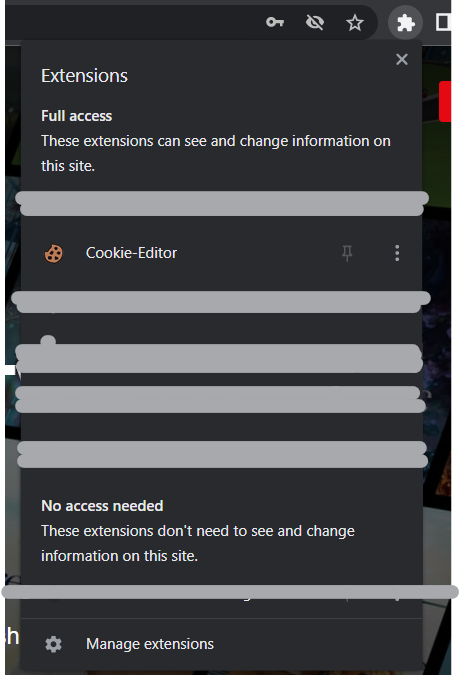
After clicking you will see this;

Step #5 - Cookies Importing
Your final step is deleting the current cookies by clicking the TRASH icon it will work fine.

All cookies were deleted

Next step is to click the IMPORT;

Json Format

Next Step is to PASTE the cookies. (Take Note: Cookies wont work if you import it on INCOGNITO)

Now click the IMPORT;

Cookies were created

Now reload the whole page, by clicking the RELOAD icon.

ENJOY!
Don’t Forget to Send feedback or Comment if problem occur.
Do not forget to provide screenshot of the screen, especially if it is working perfectly and also please include your DEVICE NAME and your SHORT MESSAGE for me.
If problem occur, please comment here on my blog site or you can direct pm me so that I can help you with your problem.


Comments